Software
FPV Track Designer: We Now Plan Our Own Race Tracks
We built our own 3D track designer: create, save, share and virtually fly race tracks right in your browser. Free, no account, with a QR code for the venue.
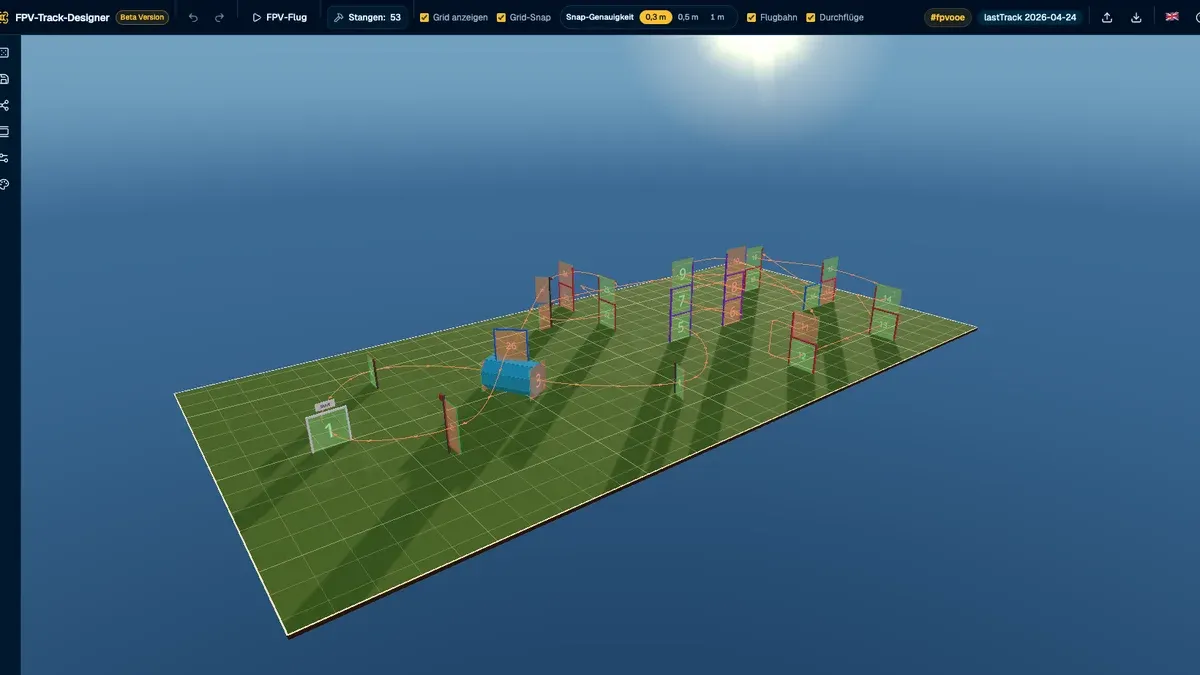
It is here: our own FPV Track Designer at trackdesigner.fpvooe.com. A 3D editor that lets us plan, save and share race tracks directly in the browser. Free, no account, no installation. In this post we show you what it can do and why we built it in the first place.
Why build our own track designer?
Track planners for FPV racing already exist. The problem: most of them are either needlessly complicated, want an account, ship your data off to some server, or already struggle with simply saving a track. We wanted a different approach:
- As simple as possible. Open the page, grab your mouse, build a track. Done.
- Stay independent. The Track Designer runs entirely in your browser, without a backend. Your tracks are stored locally on your device and they stay yours.
- Manage your favourite tracks. Saved tracks live in a gallery that you can load from again at any time.
- Link tracks anywhere. A shared track is just a link. That also makes it easy to link from the Race Manager or from Discord, so everyone knows the track before the race even starts.
What the Track Designer can do
The core idea: you see your track in 3D and edit it right in the scene, all with the mouse and drag-and-drop.
- Generate or build tracks: You set the field size and the number of gates per type, and Shuffle creates a track from that automatically. Then fine-tune it: select, move, elevate, rotate, insert and delete gates. Shift or Ctrl-click selects multiple gates at once.
- 11 gate types: start/finish, standard, H-gate, double-H, hurdle, dive, double, ladder, flags (large and small) and a tunnel. That covers our typical indoor tracks as well as outdoor courses.
- Flight path display: the ideal line with gate order, direction arrows and automatic avoidance curves is drawn live. You can also flip the entry side and change the fly-through order.
- FPV flight: the highlight inside the editor. One click and the camera flies the ideal line in first person through every gate. You immediately feel whether a track flows nicely or whether gate 5 is a lap killer.
- Undo/redo, keyboard shortcuts, an optional snap grid (0.3 to 1.0 m) for precise building and a German as well as an English interface.
- Pole counter: the top bar keeps a live count of how many poles you need to build the track, including a breakdown per gate type. Material planning for race day basically does itself.
- Saving and gallery: tracks are stored locally in your browser, and the gallery can load, duplicate and delete them. On top of that there is import and export as JSON files, so you can move tracks between devices or share them.
- Three themes: minimal, realistic and night. In the night theme the gates glow in neon, matching our indoor races.
Sharing via link and QR code
The share dialog turns your track into a link. The long link works immediately without any server round trip, a short link is created in parallel. And on top of that you get a QR code that you can download as PNG or SVG.
This ends the era of the track builder explaining ten times to late arrivals where the dive gate is and which direction the ladder gate is flown. Print the QR code, hang it up at the venue, everyone scans it with their phone and sees the track in 3D right away.
The viewer: look and fly along, without editing
The link opens a dedicated view mode on sharedtrack.fpvooe.com. It is deliberately read-only: the track cannot be edited there, only viewed. Recipients can:
- freely look at, rotate and zoom the track,
- start the FPV flight and virtually fly the track to get a feel for the corners, dives and the order,
- download the track as JSON and continue using it in the editor themselves.
The track data lives inside the link itself, so nothing is sent to a server when it is opened.
Give it a try
Open trackdesigner.fpvooe.com, hit Shuffle once and fly your first generated track in FPV mode. The Track Designer is open source (GPL v3), completely free to use and works best on desktop with mouse and keyboard, though basic two-finger touch steering works as well. The app deliberately still carries its beta badge, so a few things here and there may still change. If you build a track that we should fly at our next whoop race: bring the link to our Discord!